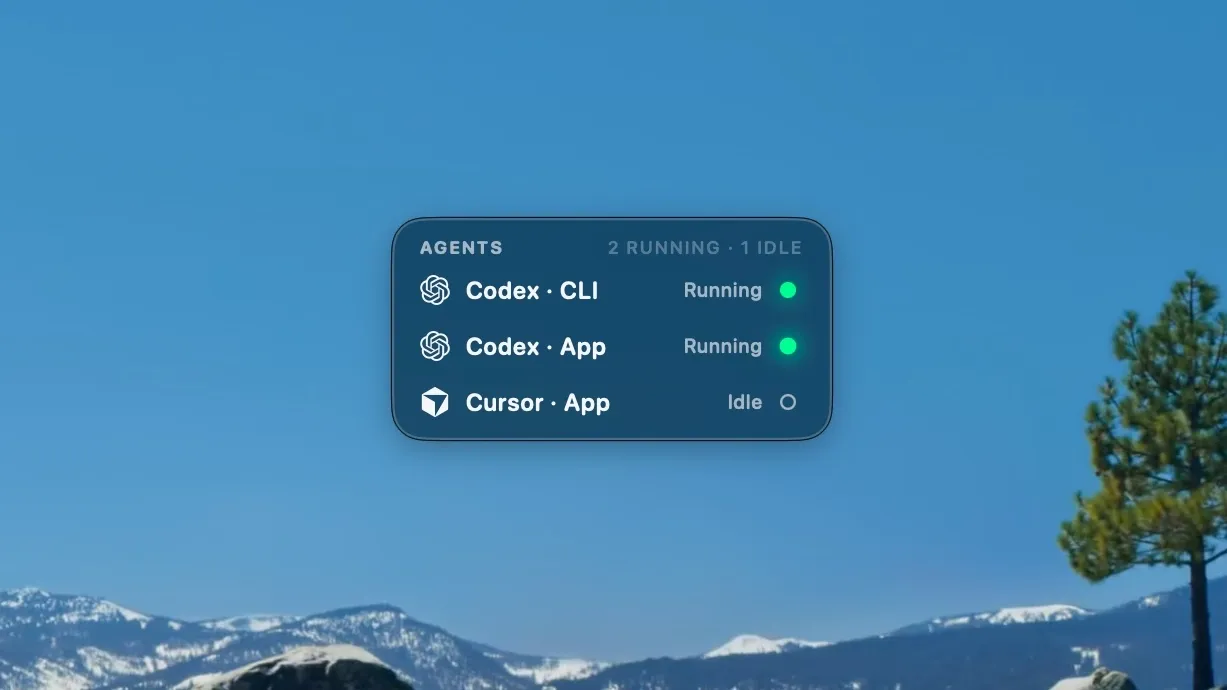
Sentinels is a tiny always-on-top macOS overlay I built to keep track of my coding agents.
The problem is simple: once you start running multiple agents at the same time, the desktop gets harder to read. One Codex session might be working in a terminal tab, another might be idle in the app, and Cursor might be waiting somewhere else. The work is technically happening, but the state of the system is scattered across windows.
I wanted a small ambient view that answered one question quickly: what are my agents doing right now?
The Problem
Coding agents introduce a new kind of background work. They run for a while, ask for approval, finish, fail, or sit idle while you move on to something else. That works fine when there is only one session. It becomes messy when several agents are spread across apps, terminals, projects, and Spaces.
Most of the friction is not in starting an agent. The friction is remembering which one is still running, which one needs attention, and where the relevant window went.
Sentinels started from that workflow gap. I did not want a full dashboard. I wanted something closer to a desktop instrument: visible, compact, and always close enough to glance at.
What I Built
Sentinels is a native macOS menu-bar app built with SwiftUI and AppKit. It renders a small floating overlay with one row per detected agent.
Each row shows the provider, the source, the current status, and a small status dot. Green means running, yellow means waiting or needing approval, gray means idle, and completed or failed states get their own colors. Clicking a row jumps back to the relevant app or terminal window.
The overlay supports Codex and Cursor out of the box.
It can detect Codex CLI sessions, Codex app sessions, Cursor CLI runs, Cursor in-app agent activity, and idle open apps.
For more reliable terminal tracking, I also added a small agentwatch wrapper that records a run id and assigns the terminal tab a unique title.
That gives Sentinels enough information to raise the exact terminal window when I click the row.
The Detection Layer
The most interesting part of Sentinels is that a normal process monitor is not enough.
A codex process can be alive while doing nothing.
A desktop app can be open without an active agent turn.
Multiple sessions can be running at once, and collapsing them into a single "Codex is running" indicator would hide the thing I actually care about.
So the detection layer combines a few signals:
- Process polling to find CLI sessions and open desktop apps.
- Codex rollout files to infer whether a turn is in progress.
- Cursor transcript files to detect active in-app agent work.
- Wrapper-recorded runs for exact terminal-window focus.
The app reads bounded tails of runtime files instead of scanning whole histories.
For Codex, it looks for a task_started event without a later terminal event.
For Cursor, it checks recent transcript activity and terminal turn markers.
That gives the overlay enough precision to show separate rows for concurrent work while still falling back to simple idle rows when nothing active is happening.
The Window
Sentinels is intentionally small, but the window behavior matters.
The overlay is a borderless non-activating NSPanel that floats above all Spaces.
It uses SwiftUI's Liquid Glass styling, self-sizes to the current agent list, and can be dragged anywhere on screen.
When released near an edge, it snaps back into a clamped visible position and persists its top-left anchor, so it stays where I put it even as rows appear and disappear.
It also avoids stealing focus. When I click a row, the overlay briefly fades, activates the target app or terminal, and then returns to full opacity. Exact terminal-window raising uses the macOS Accessibility API, which is one of those details that feels minor until the app starts taking you to the right tab every time.
What This Project Demonstrates
Sentinels is a small project, but it sits directly in the middle of how I use coding agents now. It is not trying to orchestrate them, replace their UIs, or become a second task manager. It just keeps the state of my agent work visible.
Technically, it touches native macOS UI, process inspection, file-based runtime inference, Accessibility-driven window focus, launch-at-login behavior, and careful desktop ergonomics.
The thing I like about it is that it treats agent tooling as part of the operating environment. As coding agents become more asynchronous, I think this kind of ambient observability becomes more important. You do not always need a bigger control surface. Sometimes you just need a tiny sentinel in the corner telling you where attention is needed.